
MongoDBWriter

| Short Description |
| Ports |
| Metadata |
| MongoDBWriter Attributes |
| Details |
| Mapping |
| Error Handling in Bulk Operations |
| Examples |
| See also |
Short Description
MongoDBWriter stores, removes or updates data in the MongoDB™ database using the Java driver. [1]
MongoDBWriter can manipulate with documents in a MongoDB collection. New documents can be inserted, existing documents can be updated or removed.
| Component | Data output | Input ports | Output ports | Transformation | Transf. required | Java | CTL | Auto-propagated metadata |
|---|---|---|---|---|---|---|---|---|
| MongoDBWriter | database | 1 | 0-2 |  | |  | | |
Ports
| Port type | Number | Required | Description | Metadata |
|---|---|---|---|---|
| Input | 0 | | Input data records to be mapped to component attributes. | any |
| Output | 0 | | Results | any |
| 1 | | Errors | any |
Metadata
MongoDBWriter does not propagate metadata.
This component has metadata templates. The templates are described in the documentation of MongoDBReader in section Metadata.
MongoDBWriter Attributes
| Attribute | Req | Description | Possible values |
|---|---|---|---|
| Basic | |||
| Connection | | ID of the MongoDB connection to be used. | |
| Collection name | [ 1]
| The name of the target collection. | |
| Operation |
The operation to be performed. MongoDBWriter can perform:
| See the description. | |
| Query |
Selects a subset of documents from a collection. The selection criteria may contain query operators.
Ignored by the | BSON document | |
| New value | [ 1]
|
Specifies the document to be stored in the database.
Ignored by delete operations ( For update operations, New value may contain update operators. | BSON document |
| Input mapping | | Defines mapping of input records to component attributes. | |
| Output mapping | Defines mapping of results to standard output port. | ||
| Error mapping | Defines mapping of errors to error output port. | ||
| Advanced | |||
| Batch size |
Number of records that can be sent to database in one batch. Bulk write operations may significantly increase performance. However, the whole batch is stored in memory, so increasing Batch size also increases memory requirements. | bulk write: 100 (default) | basic: 1 (default) | |
| Stop processing on fail |
If true, a failure causes the component to skip all subsequent operations
and send the information about skipped executions to the error output port.
| true (default) | false | |
| Field pattern |
Specifies the format of placeholders that can be used within
the Query and New value attributes.
The value of the attribute must contain "
During the execution, each placeholder is replaced using a simple string
substitution with the value of the respective input field, e.g.
the string " | @{field} (default) | any string containing "field" as a substring | |
[ 1] The attribute is required, unless specified in the Input mapping. | |||
Details
| Operations |
| Mapping |
| Format of the date Field Value |
Operations
There are two types of operations available for this component: bulk write and basic operations. Bulk write operations are supported since driver and DB version 3.2.
Bulk write operations (recommended)
insertOneAdds the value of the New value attribute as a new document to the target Collection. If the document does not contain the
_idfield, a generated one will be added.See also
db.collection.insertOne().updateOneUpdates a single document matching the Query, with the values specified in the New value attribute, which must contain update operators.
The
Upsertparameter is available for this operation.See also
db.collection.updateOne().updateManyUpdates multiple documents matching the Query, with the values specified in the New value attribute, which must contain update operators.
The
Upsertparameter is available for this operation.See also
db.collection.updateMany().replaceOneReplaces a single document matching the Query.
The
Upsertparameter is available for this operation.See also
db.collection.replaceOne().deleteOneRemoves a single document matching the Query.
See also
db.collection.deleteOne().deleteManyRemoves all documents matching the Query.
See also
db.collection.deleteMany().
Bulk write operations can have the following parameters:
Upsert
Only applicable to
updateOne,updateManyandreplaceOne. If enabled, the operation inserts a new document into the collection if no document matches the Query.Generated object IDs for upserted documents will be returned as the objectId field in Output mapping.
Ordered
Executes the operations in the order they arrive within every batch. If enabled, the first error causes the following operations in the same batch to be skipped.
Basic operations
insertAdds the value of the New value attribute as a new document to the target Collection. If the document does not contain the
_idfield, a generated one will be added.See also
db.collection.insert().removeRemoves objects that match the Query from the Collection.
See also
db.collection.remove().saveSimilar to
insert, adds the document specified as the New value attribute to the Collection or replaces an existing document with the same_id.See also
db.collection.save().updateUpdates at most one document that matches the Query, with the values specified in the New value attribute, which may contain update operators.
See also
db.collection.update().update_multiUpdates multiple documents matching the Query with the values specified in the New value attribute, which must contain update operators.
See also
db.collection.update()- multi.upsertIf no existing document matches the Query, inserts a new document into the Collection, otherwise performs an update. The New value attribute may contain update operators.
See also
db.collection.update()- upsert.
Mapping
Editing any of the Input, Output or Error mapping opens the Transform Editor.
Input mapping
The editor allows you to override selected attributes of the component with the values of the input fields.
| Field Name | Attribute | Type | Possible values |
|---|---|---|---|
| collection | Collection | string | |
| query | Query | string | |
| newValue | Projection | string |
Output mapping
The editor allows you to map the results and the input data to the output port.
If Output mapping is empty, fields of input record and result record are mapped to output by name.
| Field Name | Type | Description |
|---|---|---|
| numAffected | integer | The number of affected documents, only set by the update,
update_multi and upsert operations. |
| objectId | string |
The object ID of the document.
Bulk write operations: set by the
Basic operations: set by the |
| batchNumber | long | The sequence number of the current batch, starting from 0. |
| deletedCount | integer | The number of documents deleted by the current batch. |
| insertedCount | integer | The number of documents inserted by the current batch. |
| matchedCount | integer | The number of documents matched by the current batch. |
| modifiedCount | integer | The number of documents modified by the current batch. |
Error mapping
The editor allows you to map the errors and the input data to the error port.
If Error mapping is empty, fields of input record and result record are mapped to output by name.
| Field Name | Type | Description |
|---|---|---|
| errorMessage | string | The error message. |
| stackTrace | string | The stack trace of the error. |
| batchNumber | long | The sequence number of the current batch, starting from 0. |
| deletedCount | integer | The number of documents deleted by the current batch. |
| insertedCount | integer | The number of documents inserted by the current batch. |
| matchedCount | integer | The number of documents matched by the current batch. |
| modifiedCount | integer | The number of documents modified by the current batch. |
Error Handling in Bulk Operations
Each input record produces one output record either on the standard, or error output port. A record is sent to the error output port if an error occurs or the operation is skipped. In such a case, see the errorMessage field in Error mapping for details and possible solution.
Notes and Limitations
MongoDBWriter does not write maps and lists. It converts maps and lists to string and writes the string.
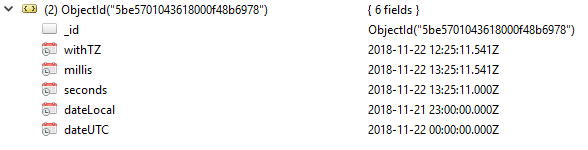
Format of the date Field Value
A date value is in an
ISO-8601 date format.
{
    withTZ : { "$date": "2018-11-22T14:25:11.541+02:00" },
    millis: { "$date": "2018-11-22T14:25:11.541" },
    seconds: { "$date": "2018-11-22T14:25:11" },
    dateLocal: { "$date": "2018-11-22" },
    dateUTC: { "$date": "2018-11-22+00:00" }
}
Examples
Writing records to MongoDB
Insert records (productID, productName, description) to
collection newProducts.
Solution
Create MongoDB Connection to target database.
Set up the following attributes:
| Attribute | Value |
|---|---|
| Connection | MyMongoDBConnection |
| Collection name | newProducts |
| Operation | insertOne |
| New value | { productID : @{productID}, productName : "@{productName}", description: "@{description}"} |